Data Integration with AI
Altova AI for MapForce
Altova AI for MapForce
Over the years, data integration has only gotten more complex. Modern organizations move data between cloud and on-premises systems, SaaS platforms, databases, APIs, and EDI partners — each with its own structures, naming conventions, and semantics. Today's ETL and data integration tools handle the execution of these data flows well, but the work of defining them — connecting hundreds or thousands of fields across systems with differing schemas, languages, and abbreviations — has remained stubbornly manual. It's the most time-consuming part of any integration project, and the part most likely to require specialized expertise.
Altova AI changes that. It brings AI directly into MapForce to handle the mechanical work of building data mappings, so developers and analysts can focus on the logic that actually matters to their business.
See how it works in the video below.
Using Altova AI in MapForce
In MapForce, you can use Altova AI to generate connections from your source and target structures. Altova AI analyzes the actual data, generates the field connections, suggests transformation functions, and produces an executable project with defined data flows and processing steps, all in the standard MapForce graphical environment.
The process is interactive: review each suggested connection and accept or decline it individually, or apply all the changes at once.
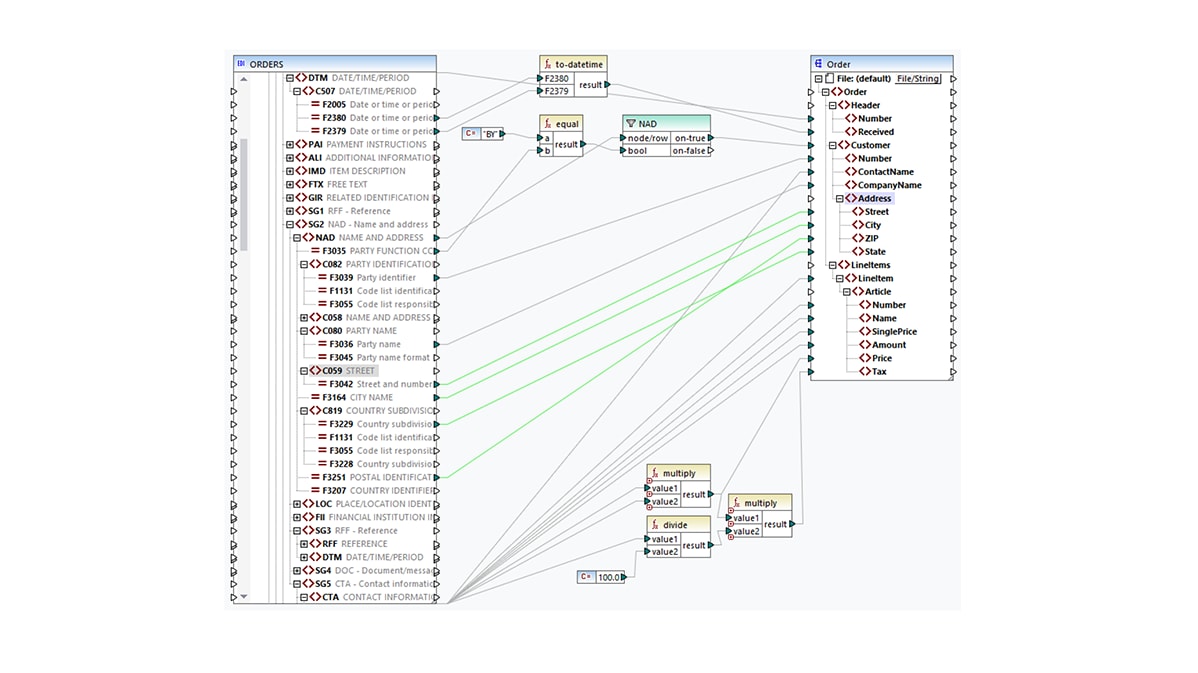
Just specify your source and target to get started. In the screenshot below, Altova AI has mapped data fields and suggested the data processing functions shown in green to create a working data integration project – in minutes and with no manual work required.
You can hover over suggestions and accept or decline each separately or all at once. If you need additional suggestions, click on a node of interest to generate additional mapping suggestions.
In the mapping shown below, Altova AI has correctly identified the required source nodes to create connections between EDI fields - which are notoriously cryptic - and the corresponding target element. The user can accept this suggestion and select another field to generate an additional connection.
Altova AI makes data integration projects faster to build, smarter in how they're constructed, and accessible to a wider range of users. Benefits include:
Altova AI is available via a subscription that customers purchase in addition to their product license. A Support and Maintenance Package (SMP) is required for purchasing Altova AI. Customers may purchase an Altova AI subscription at the same time as a new SMP or add it to an existing SMP subscription. Visit the Altova Online Shop to review all your options and start your Altova AI subscription.